
Watch Worship Live on Facebook
Zion Lutheran Church — Lexington, SC
Can't make it to church in person? You can join us for worship right from your living room using your Smart TV — anytime, anywhere.
Watching on a Smart TV
Turn On Your Smart TV
Power on your Smart TV and navigate to the Home Screen using your remote.
Open the Facebook App
Find and open the Facebook app on your TV. If it is not already installed, go to your TV's App Store (available on Samsung, LG, Roku, Fire TV, and Apple TV) and search for Facebook to download it for free.
Search for Our Page
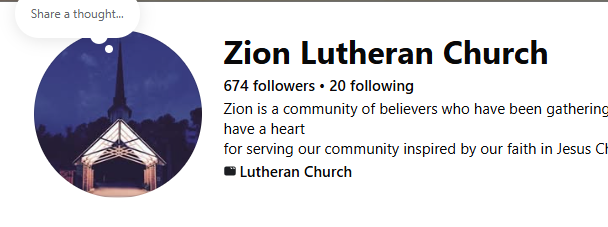
Use your remote to navigate to the Search icon (🔍). Type Zion Lutheran Lexington and select Search. Choose Zion Lutheran Church – Lexington, SC from the results.
Watch the Live Stream or Replay
During worship, a Live video will appear at the top of our page — select it to begin watching. To watch a past service, scroll down through our posts and select any worship video.
Follow Our Page (Optional)
Navigate to our page and select Follow so worship videos appear in your feed automatically. It's free and you can unfollow anytime.
Scan to Go Directly to Our Facebook Page
Point your phone camera at the code below — no typing needed!
facebook.com/zionlexsc
Questions? Ask any usher or call the church office (803) 356-2297.
Zion Lutheran Church | www.zionlexsc.com
Watch Worship Live on YouTube
Zion Lutheran Church — Lexington, SC
Can't make it to church in person? You can join us for worship right from your living room using your Smart TV — anytime, anywhere.
Watching on a Smart TV
Turn On Your Smart TV
Power on your Smart TV and navigate to the Home Screen using your remote.
Open the YouTube App
Find and open the YouTube app on your TV. Most Smart TVs (Samsung, LG, Roku, Fire TV, Apple TV) come with YouTube pre-installed. If you don't see it, go to your TV's App Store and search for "YouTube" to download it for free.
Go to the Search Screen
Once YouTube is open, use your remote to navigate to the Search icon (🔍) at the top of the screen and select it.
Search for Our Channel

Using your remote, type: Zion Lutheran 1745 and select Search. Look for Zion Lutheran Church in the results and select our channel.
Watch Live or Replay a Service
Join us live during our worship service time, or browse our videos to replay any past service at your convenience.
Subscribe (Optional)
Navigate to our channel page and select Subscribe so you never miss a new service. It's free!
Watching on a Phone or Tablet Instead?
Scan this code with your phone camera to go directly to our YouTube channel.
Point your phone camera at the code above
Questions? Ask any usher or call the church office (803) 356-2297.
Zion Lutheran Church | www.zionlexsc.com